
Introduction
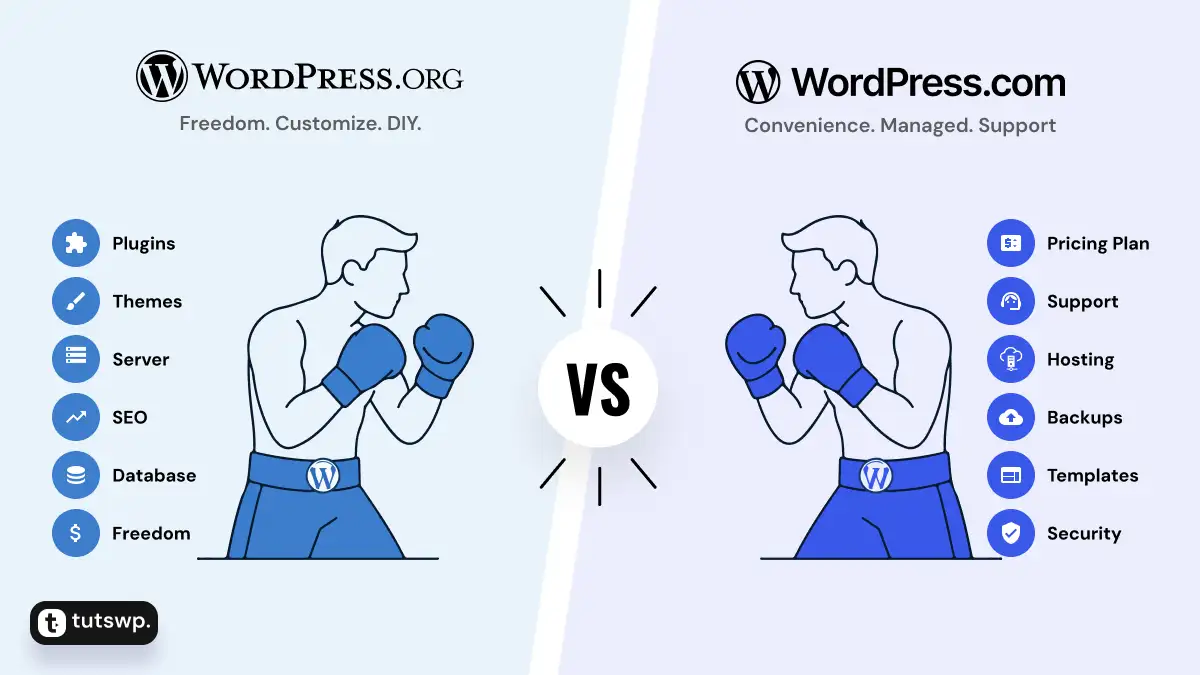
WordPress.org vs WordPress.com is one of the first questions beginners face when they’re introduced to WordPress. At first, it can be confusing: you’ll come across two official websites with the same name — WordPress — but one ends with .org and the other with .com.
At a glance, the difference looks simple: free vs paid. But that’s only part of the story — and not always true for both versions. Both platforms share the same WordPress software at their core, yet they work very differently depending on your project, budget, and long‑term goals.
WordPress powers more than 810 million websites worldwide (Over 40% of all websites). Out of this massive user base, about 740 million (about 91%) sites run on WordPress.org, while around 70 million are hosted on WordPress.com (about 9%)
Table of Contents
Understanding WordPress
WordPress began as a content management system (CMS), but over time it has grown into a complete site builder that powers millions of websites worldwide — from personal blogs and news sites to online stores and enterprise platforms.
The software makes it easy to publish content, customize design, and extend functionality without needing to code everything from scratch. That’s why WordPress remains the most popular website platform today.
Here’s where the split happens:
- WordPress.org is managed by the WordPress Foundation, a non‑profit that oversees the open‑source project.
- WordPress.com is operated by Automattic, the company founded by WordPress co‑creator Matt Mullenweg.
This distinction matters because the software is the same, but the way it’s hosted, managed, and priced is very different. That’s why beginners often ask two common questions:
- Is WordPress.org really free?
- How does WordPress.com pricing compare to WordPress.org?
Answering these questions requires looking at the fundamentals — domain names, hosting, and management — before diving into the detailed differences.
Understanding the Basics: Domain, Hosting, and WordPress
Before comparing WordPress.org and WordPress.com in detail, it helps to step back and look at the building blocks of any website: domain names, hosting, and WordPress software. Once you see how these pieces fit together, the contrast between the two versions becomes much clearer.
- Domain Name: Your site’s web address (e.g., yoursitename.com). Think of it as the signboard outside your shop — it tells people where to find you.
- Web Hosting: The server space where your site’s files, images, and database live. Hosting is like renting the actual building where your shop operates. Instead of being on your computer’s drive, it’s stored on a server that’s always online.
- WordPress Software: The system that powers your site — managing design, content, and functionality. This is the same open‑source software whether you use WordPress.org or WordPress.com.
Understanding these basics lays the foundation for the bigger question: why does WordPress come in two versions at all?
Why WordPress Comes in Two Versions
When beginners compare WordPress.org vs WordPress.com, the biggest distinction is hosting — and that hosting difference shapes everything else.
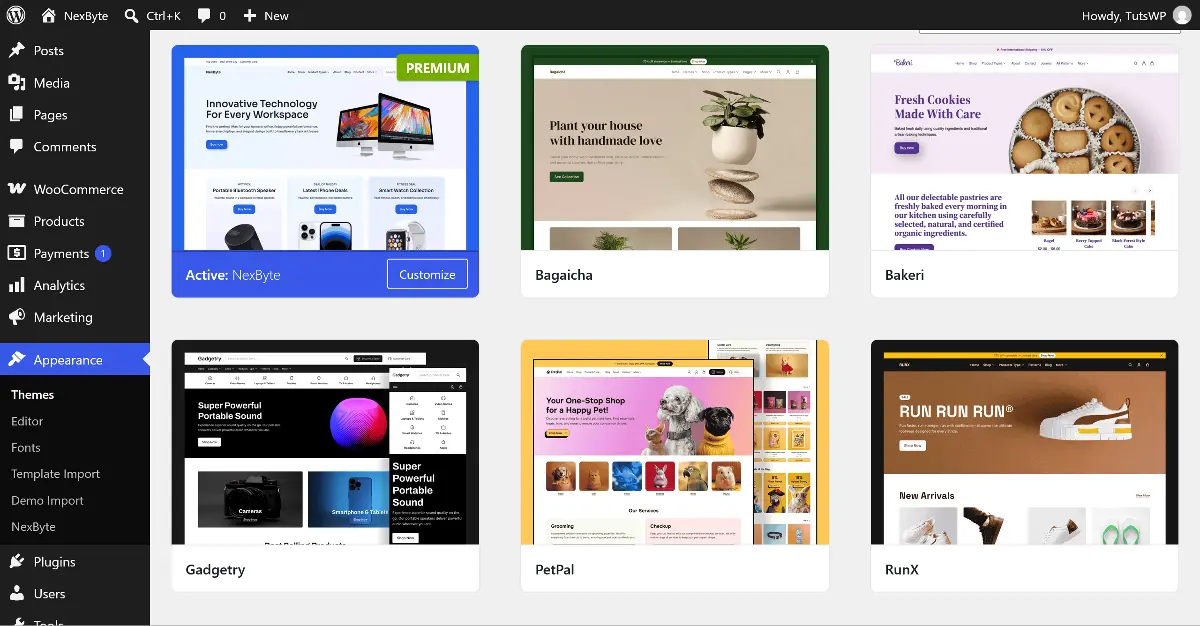
WordPress.org gives you the free software, but you must choose your own hosting provider, domain, and tools. Once installed, you have complete freedom to customize your site — including direct access to thousands of free and premium themes and plugins right from the dashboard. This flexibility means more responsibility for setup, updates, and security, but also far greater control.
For example, in the WordPress.org dashboard screenshot below, I uploaded premium WooCommerce themes from ArtifyWeb, something only possible with the unrestricted customization of WordPress.org.
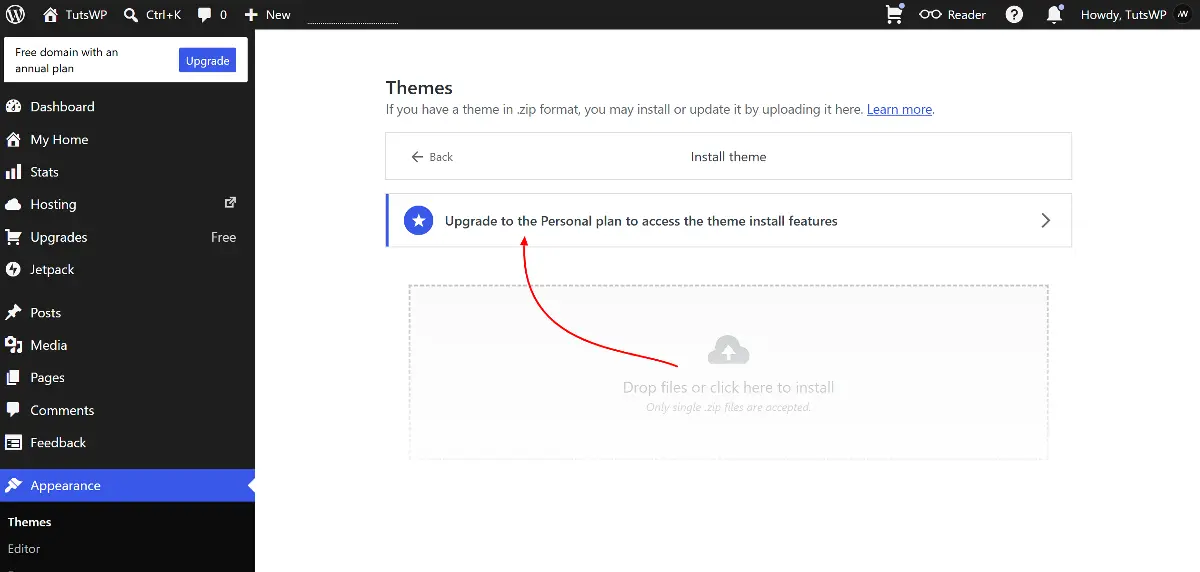
WordPress.com bundles hosting, domain options, and features into fixed pricing plans. After signup, you’re taken to a simplified dashboard where customization depends on your plan. For example, in the screenshot of the theme upload page below, it requires paid plan for uploading custom theme zips. This illustrates how WordPress.com makes setup seamless but restricts advanced customization unless you move to a paid tier.
This hosting split makes it clear that the two versions aren’t just different names — they represent two distinct approaches to building a site. And that foundation leads directly into the big picture choice: control vs convenience.
Big Picture: Control vs Convenience
The difference between WordPress.org and WordPress.com ultimately comes down to one question: do you want full control, or do you want convenience?
Think of it like setting up a business office:
WordPress.org — The Raw Lease
You get the blueprints (the free software) and choose your own landlord (hosting provider). Total freedom to build and customize — but you’re responsible if something breaks.
WordPress.com — The Managed Hub
You rent space in a fully managed co‑working hub. Everything works on day one, with support included. For more features, you simply upgrade your plan.
Now that you’ve seen the big picture, let’s break it down in detail. In the next section, we’ll compare WordPress.org and WordPress.com side by side — starting with how easy they are to set up, and then looking at costs, customization, ownership, and more.
7 Key Differences: WordPress.org vs WordPress.com
When you compare the two platforms, the differences show up in practical areas like cost, ease of use, customization, and long‑term growth. Each choice has strengths depending on whether you value freedom or convenience.
The first difference you’ll notice is cost: with WordPress.org you’ll need to pay for hosting and a domain, while WordPress.com requires choosing a plan. That’s why budgeting is the most immediate factor to consider before you start.
Costs & Budgeting: Is WordPress Free?
Like many beginners, you might be wondering: “Is WordPress free?” The answer is both yes and no — it depends on whether you choose WordPress.org or WordPress.com, and how far you want to take your site.
Note: While checking pricing for hosting providers or WordPress.com plans, remember that rates are often shown “per month,” but billing depends on how you sign up. You can usually choose monthly billing, but annual or multi‑year commitments may unlock lower effective rates. Always check the billing cycle and renewal terms before signing up.
WordPress.org (Self‑Hosted)
WordPress.org is free software, but running a site isn’t free. Think of it like getting a free car as a gift – you’ll still need to pay for fuel, insurance, and maintenance.
- Software: Free to download and use.
- Hosting: $3–$15/month, billed annually (~$36–$180 upfront).
- Domain name: ~$10–$15/year.
- SSL certificates: Often free with hosting, but can cost ~$10–$50/year separately.
- Themes & Plugins: Many are free; premium options range $30–$100+
- Extras → Backups, security tools, or developer support may add costs.
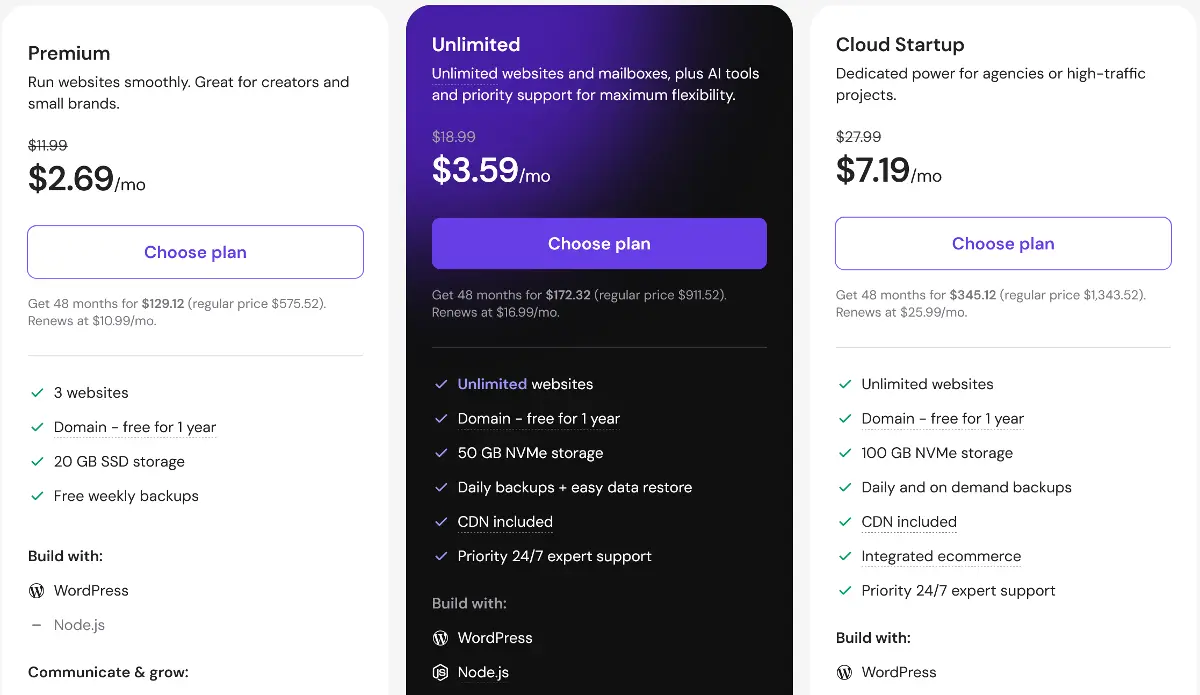
View Hostinger’s Managed WordPress Pricing
WordPress.com (Hosted Service)
WordPress.com bundles hosting and maintenance into fixed plans.
- Monthly: Pay month‑to‑month, but more expensive overall.
- Annual (default): Pay the full year upfront lowering per month cost.
- Multi‑year billing: Lower monthly averages, but bigger upfront payments.
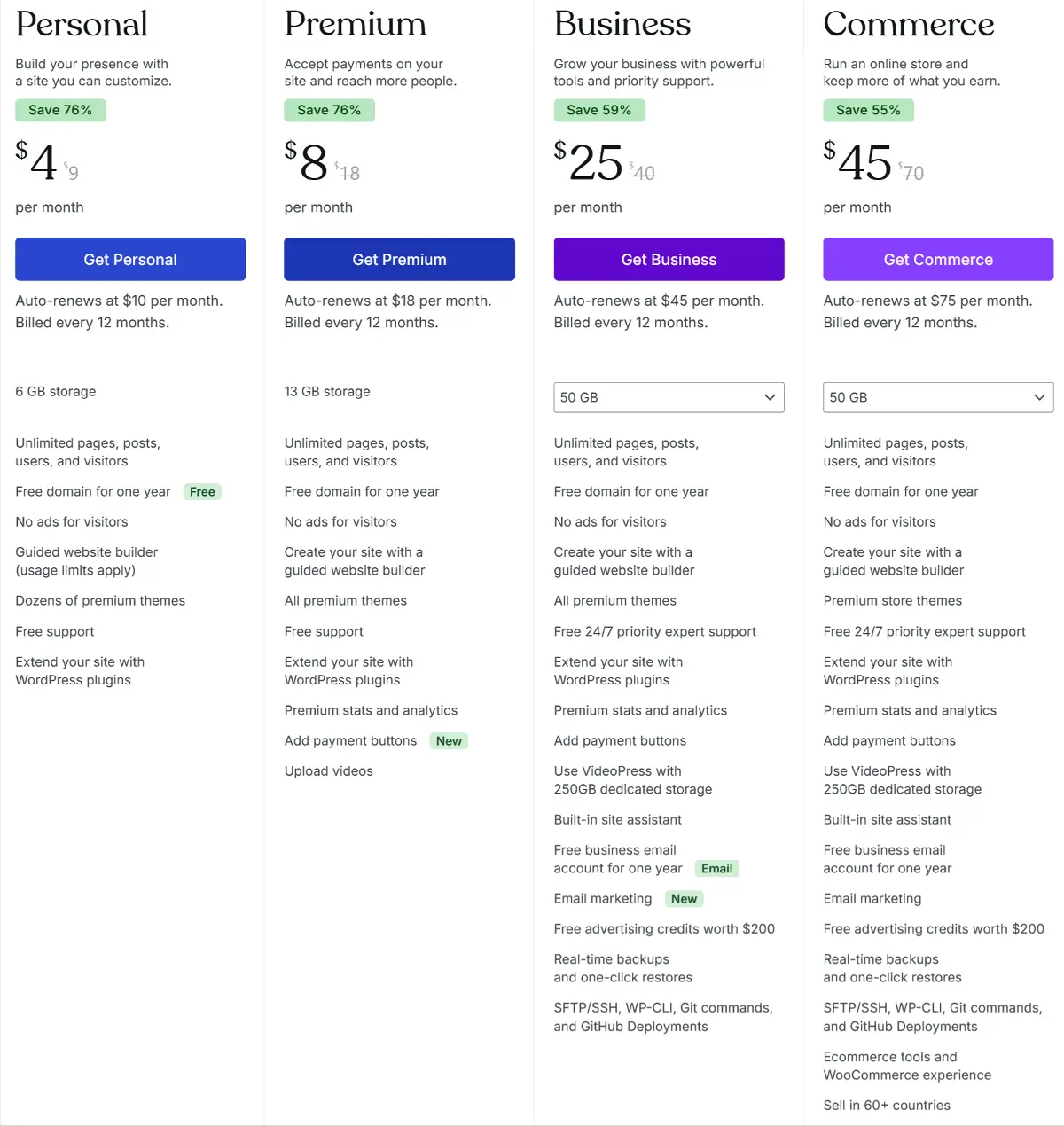
Plan overview:
- Free plan: Hosting + subdomain (yoursite.wordpress.com), limited customization, no plugins.
- Paid Plans: Costs range from about $48/year ($9/month) for an entry‑level site with basic customization and plugin access, up to $540/year ($70/month) for a full e‑commerce suite with advanced integrations.
- Renewals: First‑term promotional rates often increase, so expect higher costs when your plan renews.
Conclusion: WordPress Pricing
WordPress.org gives you flexibility to manage expenses as you grow — hosting, domains, and addons scale depending on your choices. WordPress.com offers predictable plan tiers with bundled services, but requires upfront payments and higher renewals. The right choice depends on whether you prefer variable costs you can control or fixed costs with certainty.
Once you’ve understood the financial commitment, the next question is practical: how easy is it to actually get your site live?
Getting Started & Ease of Use
The setup experience for WordPress.org and WordPress.com has become strikingly similar.
In WordPress.org, you begin by choosing a hosting provider, signing up, and selecting a domain. Most hosts now offer managed hosting optimized for WordPress and guided onboarding. For example, with hostinger’s dedicated WordPress hosting, you’re dropped straight into the WordPress dashboard after a few clicks.
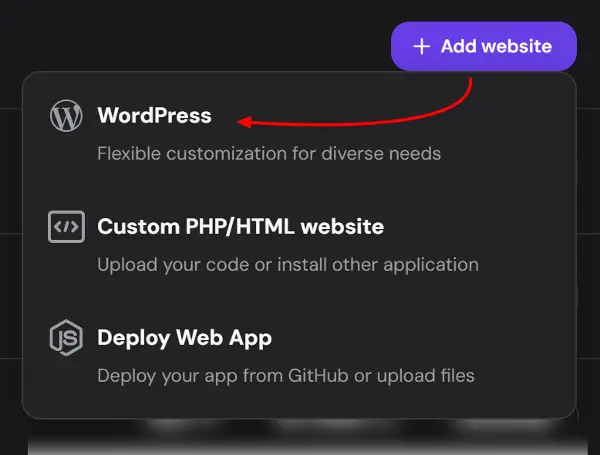
With WordPress.com, you sign up directly on the platform, choose a domain, select a plan, make a payment and arrive at the dashboard. Hosting is bundled, so there’s no separate provider to manage.
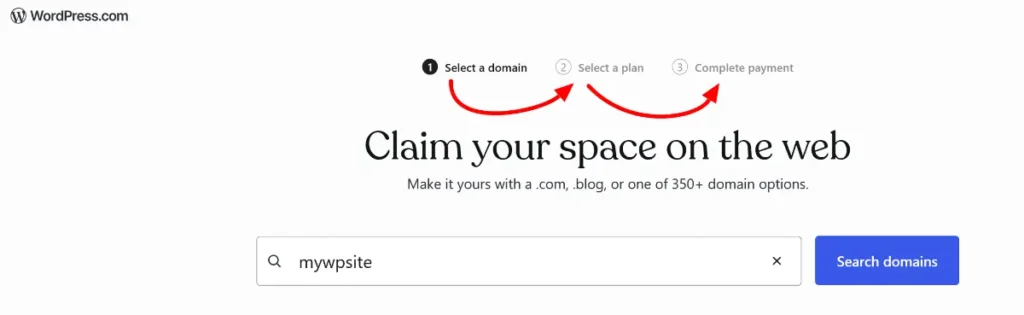
In practice, the gap between the two is almost zero today. Hosting companies have streamlined the .org process to feel just as smooth as .com, with the only extra decision being which host you want to use.
Once your site is live, the next step is making it your own. This is where themes and plugins come in — and again, platform you choose determines how much freedom you have to customize.
How You Customize Your Site
Themes and plugins are the backbone of any WordPress site.
- Themes control the design and layout — everything from colors and fonts to header, footer & page templates.
- Plugins add functionality — turning a simple blog into an online store, a learning platform, a business site with contact forms, or a performance‑optimized, SEO‑friendly project.
WordPress Marketplaces
WordPress has a vast ecosystem of marketplaces:
- Free WordPress.org directory — thousands of community‑built themes and plugins. Most follow a freemium model: basic features are free, while advanced options or professional designs require payment.
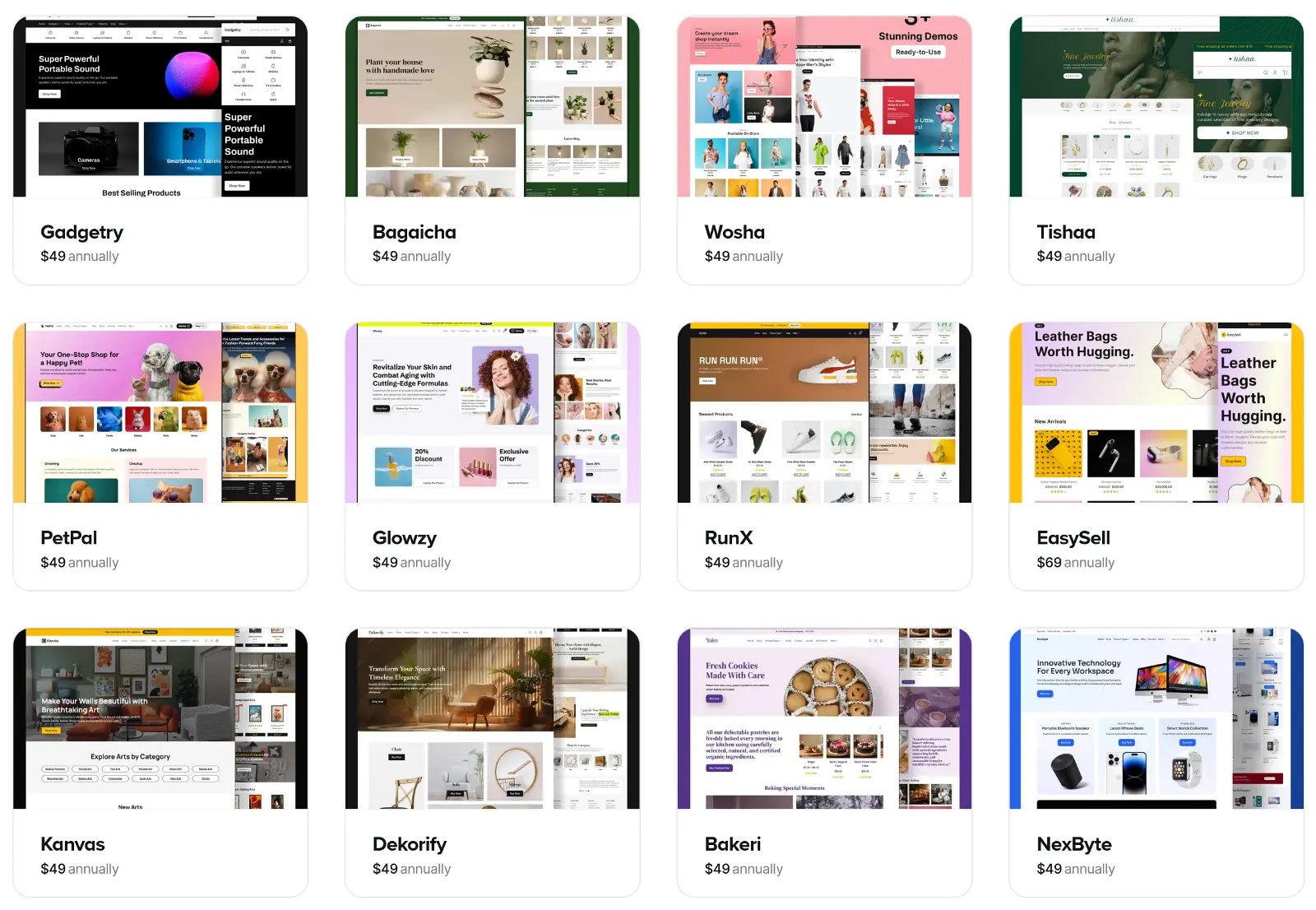
- Premium marketplaces — WooCommerce themes, ThemeForest, and others offering unique designs and specialized add‑ons for e‑commerce and beyond.
- Independent authors — creators like ArtifyWeb, who provide free WordPress themes and premium WooCommerce themes tailored for online stores.
WordPress.org
- You can install anything you download or purchase — whether from WordPress.org, ThemeForest, ArtifyWeb, or a custom developer.
- You can hire developers to build bespoke solutions, with no restrictions on what you add or modify.
WordPress.com
- Free plan: Limited to built‑in themes, no plugin support.
- Paid plans: Unlock plugin installation and external theme uploads. You gain access to the WordPress.com plugin directory (~50,000+ plugins) and limited to all of their premium themes library.
- Higher‑tier plans: Expand design flexibility, advanced integrations, and e‑commerce features.
- However, you’re still within WordPress.com’s managed environment, meaning some server‑level customization available on WordPress.org aren’t possible.
Customization is about freedom, but ownership is about responsibility. Once you’ve chosen your themes and plugins, the next question is: who controls your site’s files, backups, and domain?
Control Over Data & Ownership
One of the biggest differences between WordPress.org and WordPress.com is who ultimately controls your site’s data, files, and future.
WordPress.org
You own everything. Your files, database, backups, migration and domain are under your control. You decide where your site is hosted, how it’s secured, and even move your site to another host anytime. This freedom also comes with responsibility — you must manage updates, backups, and security yourself (or pay a host or developer to handle them).
WordPress.com
Your site lives inside managed environment of WordPress.com (Automattic). They handle hosting, updates, and security, but they also set the rules. While you own your content, WordPress.com controls the infrastructure. If you ever want to move your site, you’ll need to export your content and rebuild it elsewhere, which can be limiting compared to the portability of WordPress.org.
WordPress.org gives you full ownership and portability, while WordPress.com offers convenience with trade‑offs in control.
The next question is how far you can take it.
Earn with WordPress
Once your site is stable, the next step is scaling it and turning it into a source of income.
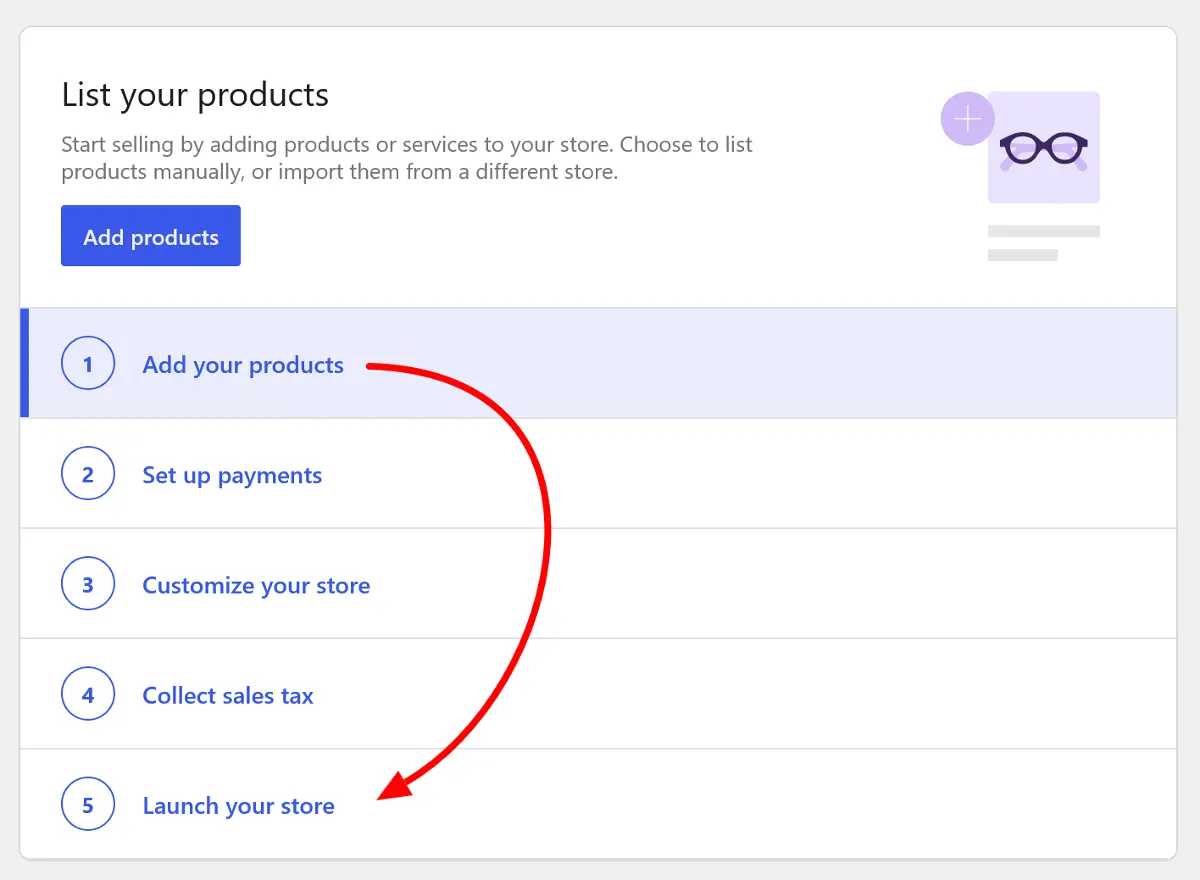
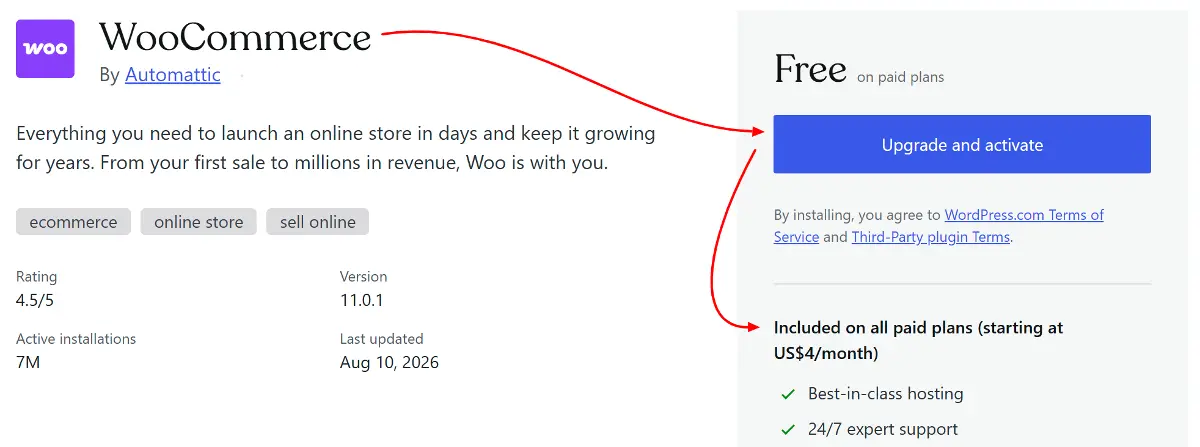
On WordPress.org, growth is essentially unlimited. Because you control hosting and plugins, you can add advanced features like membership systems, online courses, or full e‑commerce stores using plugins like WooCommerce or Easy Digital Downloads. Monetization is unrestricted — you can run ads from any network, accept payments, or integrate third‑party services however you like. Your growth is limited only by your hosting power and imagination. The trade‑off is that you’re responsible for scaling your hosting and managing performance as traffic increases.
For example, you can install WooCommerce and follow the onboarding steps to launch your online store without extra cost.
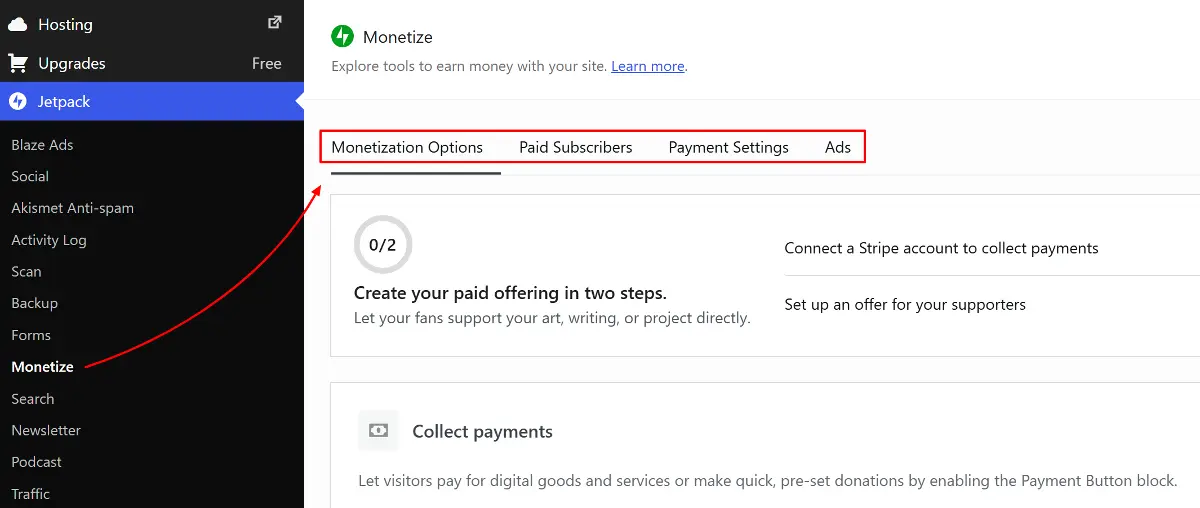
On WordPress.com, monetization works more like a membership club with tiered access. Free and Personal plans don’t offer earning tools. The Premium plan introduces simple payment buttons, letting you accept one‑time or recurring payments.
To unlock advanced integrations and full e‑commerce capabilities, you need to move up to the Business or Commerce plans. At those levels, you gain access to subscriptions, ads through WordAds, WooCommerce, and a suite of tools for selling products and services online. Growth is possible, but it’s paced by the plan you choose and always within WordPress.com’s managed framework.
These growth tools are only useful if people can actually discover your site. The next factor to compare is search engine optimization (SEO) — and here again, hosting determines how much control you have over visibility.
Visibility & Performance
Search engine optimization (SEO) and site performance determine how easily people find your site and how smoothly it runs once visitors arrive.
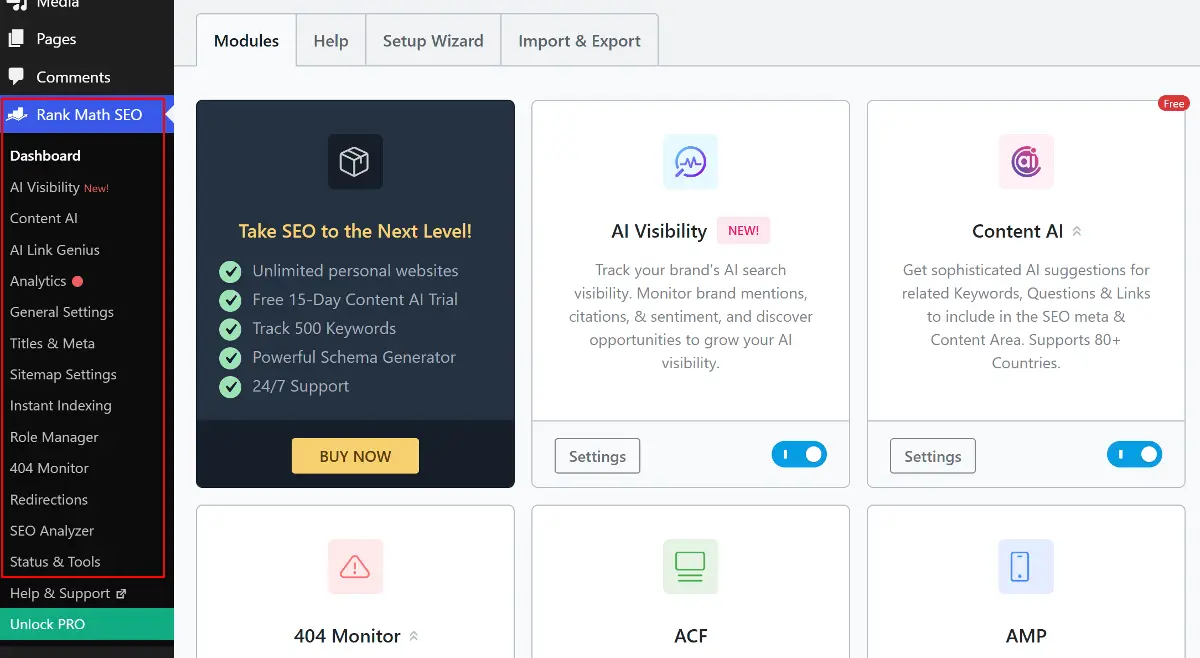
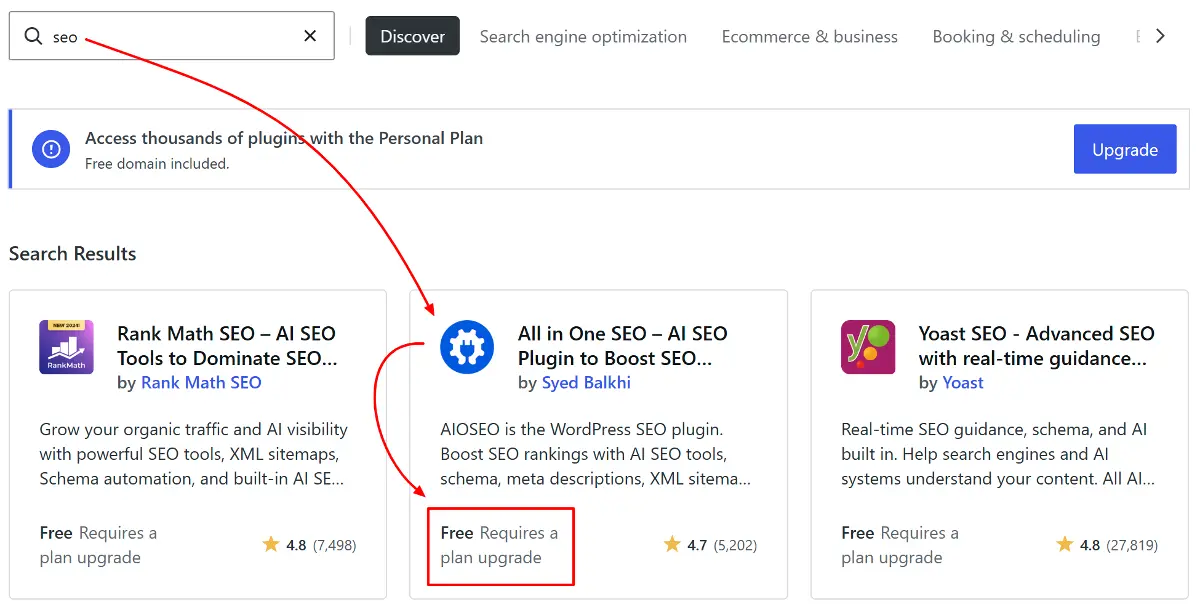
On WordPress.org, you have complete control over SEO. You can install powerful plugins like Yoast SEO or Rank Math, customize metadata, manage sitemaps, and fine‑tune performance for search rankings. Because you own the hosting environment, you can also optimize server speed, caching, and security — all of which directly affect SEO visibility.
However, many of the most advanced SEO features in these plugins require upgrading to their premium versions, so while the freedom is unlimited, the most sophisticated tools often come at an extra cost. The free version of SEO plugins are good enough for most of the WordPress sites to get started.
On WordPress.com, SEO tools expand with your plan level. Free and Personal plans include only the basics — clean URLs, SSL, automatic sitemaps, and AMP for mobile speed. Premium adds manual control over titles, meta descriptions, canonical URLs, and the ability to hide pages from search engines. Full SEO flexibility — including plugin support, advanced metadata management, and analytics integrations — unlocks at the Business and Commerce tiers. WordPress.com also handles technical aspects like uptime, CDN, and SSL automatically, but you’re restricted to the tools they provide.
These growth tools are only useful if your site stays online and secure. The final comparison is Maintenance & Security — who handles updates, backups, and protection against threats.
Strong visibility and fast performance matter if your site remains reliable over time. The next comparison is Maintenance & Security — who ensures updates, backups, and protection against threats.
Maintenance, Security & Support
Running a website isn’t just about launching it — it’s about keeping it secure, updated, and knowing where to turn when issues arise. Whether it’s a theme conflict, plugin error, or hosting problem, the kind of support you can access makes a big difference.
Support can come through different channels depending on your setup: free community forums, official documentation, hosting provider assistance, or premium customer service from theme and plugin authors. WordPress.com also offers direct help through its paid plans.
Both WordPress.org and WordPress.com share some common support foundations. Each has free community forums where users can ask questions and share solutions, and both provide extensive documentation to guide you through setup and troubleshooting. Hosting providers, as well as theme and plugin developers, often publish their own docs and tutorials. If you purchase premium versions of themes or plugins, you typically gain access to dedicated support via email or live chat.
The differences emerge in how support and maintenance are structured. On WordPress.org, you’re responsible for updates, backups, and security. Most hosts offer automated tools, and plugins can handle backups, firewalls, and malware scans. Guided support is available from hosting providers or theme/plugin authors, but it’s decentralized and often requires an upgrade or extra payment.
On WordPress.com, maintenance and security are bundled into the platform. Updates, backups, and patches are handled automatically, so you don’t need to worry about technical upkeep. Free users rely on community forums, while paid plans include direct help from WordPress.com’s “Happiness Engineers,” who provide one‑on‑one assistance within the managed environment. The trade‑off is that you can’t customize every detail — advanced security or backup configurations are limited compared to WordPress.org.
Because WordPress.org powers the overwhelming majority of WordPress sites, if you’re searching for help online, most guides and resources will assume you’re using WordPress.org — which can be both an advantage in terms of community support and a challenge if you’re on WordPress.com.
Quick Comparison: WordPress.org vs WordPress.com
Let’s see the differences laid out clearly. Here’s a quick snapshot that puts the two platforms next to each other, so you can compare them at a glance based on what’s most important for you:
| Aspect | WordPress.org | WordPress.com |
|---|---|---|
| Costs | Hosting & extras ~$36–$180+/year | Free plan + paid tiers from ~$48/year to ~$540/year |
| Ease of Use | Manual setup, steeper learning curve | Instant signup, hosting included |
| Customization | Unlimited themes & plugins | Limited, expands with higher plans |
| Ownership | Full control, portable data | Content owned by you, but infrastructure controlled by WordPress.com |
| Growth | Unlimited monetization and scaling | Growth tied to plan level; advanced features only on higher tiers |
| SEO & Performance | Full plugin and server control | Tiered SEO tools |
| Maintenance & Support | You handle updates, backups, and security; support via forums, docs, hosts, and theme/plugin authors | Automatic updates, backups, built‑in security; forums for free users, direct “Happiness Engineer” support on paid plans |
Which is Best for You? WordPress.org vs WordPress.com
By now, you’ve seen the differences in cost, ease of use, customization, ownership, growth, SEO, and support. The next step is figuring out which platform fits your needs.
If you’re a hobbyist, blogger, or someone building a personal site, WordPress.com is often the smoother path. It’s managed, quick to set up, and lets you focus on writing or sharing without worrying about hosting or security.
If you’re a business owner, e‑commerce seller, or planning a long‑term project, WordPress.org is the stronger choice. It gives you full control over customization, scalability, and monetization — essential if you want to grow beyond a simple site. You can either learn the basics yourself, hire developers, or rely on premium support from your hosting provider, theme, or plugin authors to keep things running smoothly.
If you’re coming from another platform or have tech experience, WordPress.org will feel more natural. Whether you’re migrating from Shopify, Wix, Squarespace, Medium, Substack, or YouTube — or you’re a designer, developer, educator, or startup founder — WordPress.org gives you the flexibility to extend functionality, integrate advanced tools, and build exactly what you need.
Though it’s better to decide correctly beforehand, your choice isn’t locked in forever.
Moving Your Site: WordPress.org and WordPress.com
Switching between WordPress.org and WordPress.com is possible, and many site owners do it as their needs evolve.
Many users start with WordPress.com for simplicity and later migrate to WordPress.org as they learn the basics and feel comfortable taking on more control — or move the other way if they become uneasy with the responsibilities of self‑hosting and plugin management, preferring the ease of a fully managed environment.
The most common move is from WordPress.com → WordPress.org. People often begin with WordPress.com because it’s simple and managed, then migrate to WordPress.org when they want more freedom, advanced plugins, or full monetization. The process involves exporting your content and importing it into a self‑hosted WordPress.org site. While your posts and pages transfer smoothly, design and plugin settings usually need to be rebuilt — think of it as moving your furniture into a new house where the layout is different.
Going the other way — from WordPress.org → WordPress.com — is less common but appealing if you want to simplify. On higher‑tier WordPress.com plans, you can still upload custom plugins and themes. The trade‑off is that WordPress.com’s managed environment may limit some of the technical freedom you’d have on a self‑hosted WordPress.org site.
FAQs: WordPress.org vs WordPress.com
Do I need coding skills to use WordPress?
No. Both platforms let you build sites without coding. WordPress.org gives you more flexibility if you do want to customize with code, while WordPress.com keeps things simple with built‑in tools.
Is WordPress free?
The WordPress software itself is free. With WordPress.org, you’ll pay for hosting and a domain. With WordPress.com, you can start free, but advanced features require a paid plan.
Can I switch platforms later?
Yes. You can move from WordPress.com to WordPress.org (or the other way around). Your content transfers, but design and plugin settings usually need to be rebuilt.
Which is better for e‑commerce?
WordPress.org is stronger for full online stores with WooCommerce and advanced integrations. WordPress.com supports e‑commerce too, but only on higher‑tier plans.
Which is easier for beginners?
WordPress.com is the smoother starting point since it’s managed and quick to set up. WordPress.org requires more setup, though the gap is smaller nowadays thanks to beginner‑friendly hosting.
Can I make money with WordPress?
Yes. Both platforms support monetization. WordPress.org gives you full freedom — ads, products, memberships, anything you like. WordPress.com allows monetization too, but options depend on your plan level.
Will my site be secure?
On WordPress.com, security is handled for you. On WordPress.org, you’ll need to manage updates, backups, and security plugins yourself — but you also get more control over how it’s done.
Final Takeaway
Choosing between WordPress.org and WordPress.com comes down to what you value most: flexibility or simplicity, variable costs or fixed pricing.
WordPress.org is free software that gives you full control. You choose your hosting, domain, and add‑ons, so costs scale as your site grows. It’s powerful and customizable, but requires setup and ongoing responsibility.
WordPress.com bundles hosting, updates, and security into clear plan tiers. Costs are predictable, but renewals can rise, and customization is limited unless you upgrade. It’s easier to start with, but less flexible if you want advanced features later.
Migration is possible in both directions, so you’re never locked in — but switching means extra work to rebuild design and features. That’s why it’s best to think ahead and choose the platform that matches your long‑term goals and budget from the start.
In short:
- Pick WordPress.org if you want freedom, scalability, and control over costs.
- Pick WordPress.com if you want convenience, certainty, and bundled pricing.
My Recommendation: WordPress.org vs WordPress.com
Together, costs, ease of use, customization, ownership, growth, SEO, and support define the trade‑offs between WordPress.org and WordPress.com. The choice ultimately comes down to whether you value freedom and responsibility or convenience and guided support.
Whichever path you choose, WordPress gives you the tools to share your ideas, grow your presence, and build something that lasts.
I personally recommend WordPress.org for most people who are looking to build a website. As this comparison shows, neither version of WordPress is truly free when running a live site. However, WordPress.org sites can be almost as convenient as WordPress.com once you get a bit of expert guidance — which we’ll provide throughout this tutorial series. From here on, our tutorials will focus on the WordPress.org version, helping you build, customize, and grow your site with confidence.